


In the final stages of a high-stakes investigation, you aren’t just hunting for evidence; you are hunting for the absence of evidence. Professional attackers and “power-user” suspects employ Anti-Forensics—the deliberate attempt to manipulate, erase, or corrupt digital evidence to make a forensic examination difficult or impossible.
For a Forensic Operator, anti-forensics is often the “Ultimate Evidence.” While a suspect might explain away a malicious file, it is much harder to explain why they ran a specialized program to military-grade wipe their unallocated space three minutes before a raid.
1. The Taxonomy of Deception
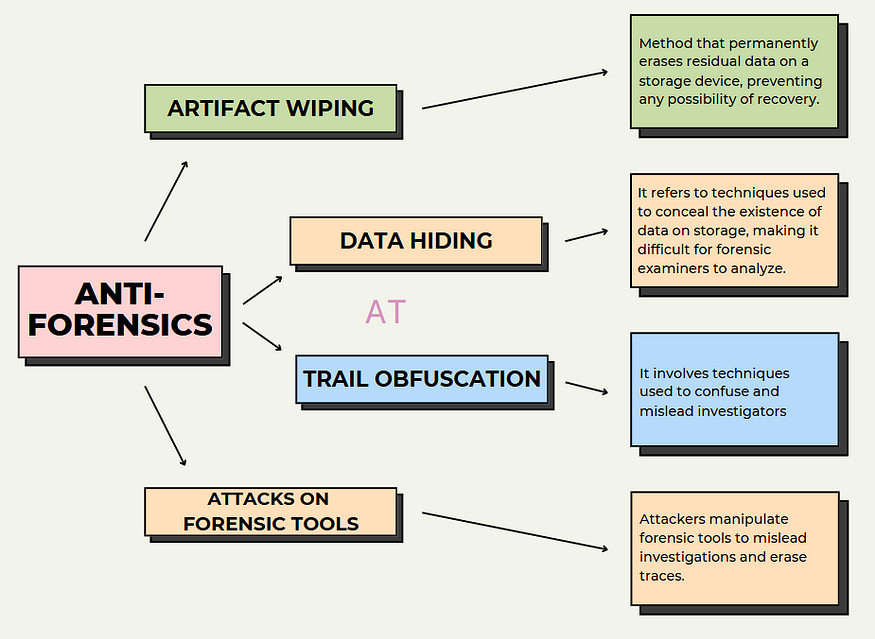
Anti-forensics generally falls into four tactical categories:
- Data Erasure (Wiping): Overwriting data with zeros or random patterns to defeat carving.
- Data Hiding (Steganography/Encryption): Concealing data inside other files or behind uncrackable algorithms.
- Timeline Manipulation (Timestomping): Changing MACB timestamps to teleport a file’s “birth” back in time.
- Artifact Destruction: Disabling logs, clearing Prefetch, or using “Live OS” environments (like TAILS) that run entirely in RAM.
2. Identifying Data Wiping and “Zero-Filling”
When a file is normally deleted, the data remains. When it is wiped, it is overwritten.
- The “Zero-Fill” Signature: If you open a disk image in a Hex Editor and see megabytes of
00 00 00 00orFF FF FF FFin unallocated space where there should be “entropy” (random fragments of old data), you have found a wipe. - Wiping Tool Artifacts: Tools like BCWipe, Eraser, or CCleaner often leave their own tracks. For instance, some wipers rename files to
ZZZZZZZZ.ZZZbefore deleting them. Finding these filenames in the MFT Slack or the $UsnJrnl is a 100% indicator of intent.
3. Detecting Timestomping (The Temporal Anomaly)
As we touched on in Phase 03, attackers love to “backdate” their malware.
- The MFT Discrepancy: Legitimate Windows files have their
$STANDARD_INFORMATION(SI) and$FILE_NAME(FN) timestamps in sync. Anti-forensic tools usually only modify the SI attribute. - The Chronological Impossible: If a file’s “Creation Time” is
2010, but its parent folder was created in2024, you have an anatomical impossibility. A child cannot be older than its parent in the NTFS hierarchy.
[Image showing the discrepancy between $STANDARD_INFORMATION and $FILE_NAME attributes in a forensic tool]
4. Real-World Example: The “Incriminating” Void
The Scenario: A system admin is suspected of installing a backdoor. Upon analysis, the C:\Windows\Prefetch folder is completely empty, and the C:\Windows\System32\winevt\Logs directory only contains events from the last 10 minutes.
The Forensic Analysis:
- Evidence of Execution (p3.3): The operator checks the Shimcache. Even though Prefetch was cleared, the Shimcache (which lives in the Registry/RAM) still shows that
CCleaner.exeandWipeFreeSpace.exewere executed recently. - Registry Remnants (p3.2): The
UserAssistkey shows that the user manually clicked on a “Log Wiper” tool multiple times. - Event Log Gaps: The operator finds Event ID 1102 (“The audit log was cleared”). This event records who cleared the log and when.
The Conclusion: The suspect didn’t just “clean their PC.” They committed a deliberate act of Spoliation of Evidence. In many jurisdictions, proving that a suspect destroyed evidence is just as legally powerful as finding the evidence itself.
5. Stealth in the Shadows: Partition & Volume Hiding
Advanced suspects may use “Hidden Volumes” (e.g., VeraCrypt).
- The Tell: Look for “Unpartitioned Space” that doesn’t make sense. If a 1TB drive only has a 200GB partition, what is in the other 800GB?
- The Entropy Test: Encrypted data looks like “Perfect Randomness.” Forensic tools use Entropy Analysis to find blocks of data that have no repeating patterns. If a sector has an entropy score of 7.99 (out of 8), it is almost certainly an encrypted container or a hidden volume.
6. Tactical Workflow: Countering Anti-Forensics
- Trust Nothing: Assume the timestamps are lying. Always correlate with the Super Timeline (p5.2).
- Look for “The Tools of the Trade”: Search the Amcache and Shimcache for known wipers, encryptors, and MAC-changers.
- Check the Registry for Disabling Commands: Search for keys like
ClearContents,NoLog, orEnablePrefetcher = 0. - Analyze the USN Journal: It records the metadata changes (like renames and deletions) that wipers try to hide. Even if the file is gone, the journal remembers the name change to
Z.Z.