


The modern web browser is a relentless digital archivist. To facilitate speed and user convenience, it constantly writes data to the disk in the form of history, caches, and cookies. However, there is a dangerous misconception that frequently emboldens suspects: the belief that “Incognito” or “Private” mode renders their actions invisible. To a forensic operator, this is a myth.
1. The Mechanics of Browser Storage: SQLite Ecosystem
Browsers do not store your data in simple text files; they use SQLite databases. These databases are highly structured and contain multiple tables that interlink a user’s digital life.
- History Databases: These record every URL visited, the “Transition Type” (whether the user typed the URL, clicked a link, or was redirected), and the “Visit Count” which helps establish a pattern of behavior.
- Downloads: These logs track every file pulled from the web, recording the source URL, the local destination path on the disk, and the file size.
- Cookies: These are small data snippets used for session persistence. They can prove a user was authenticated to a specific webmail account or a hidden criminal forum at a specific time.
- Autofill & Web Data: This database stores usernames, physical addresses, and even partial credit card numbers entered into web forms.
2. Debunking the “Incognito” Myth
The “Private Browsing” feature is marketed as a way to surf the web without leaving a trace. While it is true that the browser attempts to delete session-specific SQLite entries when the window is closed, it cannot bypass the fundamental laws of Operating System forensics.
- The RAM Residue (p2.1): While the browser may not save history to the disk, the data must still exist in the System RAM to be displayed on the screen. If an operator captures the memory while the session is active or shortly after, they can “carve” URLs, search queries, and even page fragments directly from the dump.
- DNS Cache Remnants (p2.4): Before the browser connects to
hidden-site.com, the OS must resolve the IP address. This request is stored in the DNS Client Cache, which is independent of the browser’s private mode settings. - File System Slack (p3.1): When the browser “deletes” its temporary private database upon closing, the NTFS file system merely marks those clusters as available. Unless the drive is an SSD with active TRIM or the suspect uses a specialized wiper, a forensic operator can carve Unallocated Space and MFT Slack to recover the “deleted” history.
- Pagefile & Hibernation Files: If the system moves data from RAM to the pagefile.sys to free up memory, the “private” data is written to the physical disk, where it remains until overwritten.
3. Chromium Artifacts (Chrome, Edge, Brave)
Google Chrome and Microsoft Edge both run on the Chromium engine, meaning their forensic artifacts are nearly identical in structure and location.
- Path:
\Users\<Username>\AppData\Local\Google\Chrome\User Data\Default\ - History File: An SQLite database containing the
urls(global history) andvisits(individual visit instances) tables. - Login Data: Stores saved passwords. While encrypted via the Windows DPAPI, they can be decrypted if the investigator has the user’s login credentials or the system’s master key.
- Top Sites: A database that tracks the user’s most frequently visited pages, which can provide a “lifestyle” snapshot of the suspect.
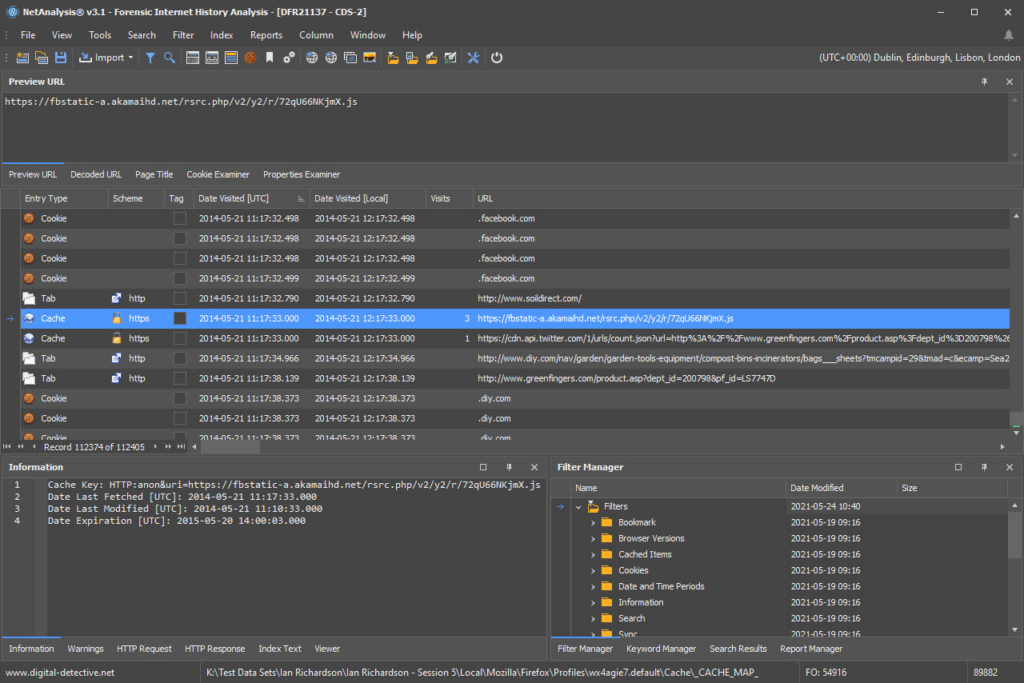
4. Firefox Artifacts: The “Places” Engine
Firefox utilizes a unique system known as the “Places” architecture to manage its data.
- Path:
\Users\<Username>\AppData\Roaming\Mozilla\Firefox\Profiles\<random_string>.default\ - places.sqlite: This is the “God file” for Firefox. It stores both the browser history and the bookmarks in a single, complex database.
- formhistory.sqlite: A high-value target that records everything a user has typed into search bars or web forms, often revealing the specific keywords a suspect used during their research.
5. Tactical Analysis: The Cache Carve
The Browser Cache is a temporary storage area for images, scripts, and stylesheets. This is where “Visual Proof” is found.
- Investigative Scenario: If a suspect claims they never saw a specific illegal image, the cache can prove otherwise. If that image resides in the cache folder, it was physically downloaded and rendered on the user’s screen.
- Tooling: Forensic tools like ChromeCacheView or NirSoft’s MozillaCacheView allow an operator to rebuild the images from raw cache chunks, providing a gallery of exactly what the user viewed.
6. Technical Workflow: Extraction and Correlation
A professional operator does not simply browse the history; they correlate it with the OS timeline.
- Extraction: Use KAPE (Kroll Artifact Parser and Extractor) to target browser artifacts, ensuring the SQLite databases are copied without corruption.
- Parsing: Use Hindsight or BrowserHistoryView to convert “Webkit Timestamps” (microseconds since Jan 1, 1601) into human-readable UTC time.
- Correlation: Match the browser history timestamps with LNK files (p3.4) and Prefetch (p3.3). If the browser shows a visit to a “Download” page, followed by a Prefetch entry for an installer, and an LNK file for a new document, the Chain of Intent is complete.
While the browser reveals what a user searched for, email forensics reveals who they conspired with. Email is the digital equivalent of a certified letter; it carries not only the message but a permanent record of every server it touched, the software used to write it, and the true identity of the sender, often hidden behind layers of spoofing.
1. The Anatomy of an Email Archive (.PST vs .OST)
In the Windows environment, primarily through Microsoft Outlook, email data is stored in two distinct types of “Personal Storage Table” files.
- .PST (Personal Storage Table): These are “Offline” archives. When a user moves emails out of their inbox into a local folder to save space, they are stored here.
- .OST (Offline Storage Table): These are local “mirrors” of a server-side mailbox (like Exchange or Office 365).
- Forensic Intel: If a suspect deletes an email from the server, it may still exist in the local
.ostfile on their hard drive until the next synchronization cycle.
- Forensic Intel: If a suspect deletes an email from the server, it may still exist in the local
2. The “Digital Postmark”: Header Analysis
The most critical part of an email is the part the user never sees: the Header. This is the metadata “envelope” that contains the true history of the message.
- Received Headers: These are the “Hops.” Every mail server that handles the message adds its own “Received” line.
- The Hunt: By tracing these hops from bottom to top, a forensic operator can find the Originating IP Address—the physical location of the sender before they hit the first mail server.
- X-Mailer / User-Agent: This reveals exactly what software was used to send the email (e.g., “Outlook 2016”, “Python-smtplib”). If a “corporate” email was sent via a Python script, it is almost certainly automated malware or a spoofed phishing attempt.
- Message-ID: A unique string generated by the first mail server. This is used to track the email across different logs (p3.4).
3. Attachment Forensics: The Trojan Horse
Attachments are not just files; they are payloads. In an investigation involving data exfiltration, the .pst file will contain the actual binary of the sent files.
- MIME Encoding: Emails cannot send binary files (like
.exeor.pdf) directly. They must encode them into text (Base64). - The Recovery: A forensic tool can “rebuild” these attachments from the encoded text. Once rebuilt, we cross-reference the attachment’s hash with the MFT (p3.1) to see if it was stolen from the local drive.
4. Deleted Email Recovery
When an email is deleted in Outlook, it moves to the “Deleted Items” folder. When it is emptied from there, it enters “Slack Space” within the .pst or .ost file.
- The Technique: Because
.pstfiles are essentially databases, the records are not immediately wiped. Professional forensic tools like Kernel for PST Recovery or EnCase can scan the database “pages” to find emails that the user thought were permanently gone.
5. Technical Workflow: Interrogating the Mailbox
- Acquisition: Use KAPE to target the
%AppData%\Local\Microsoft\Outlookdirectory to grab all.ostand.pstfiles. - Parsing: Use PST Walker or Magnet AXIOM to index the thousands of emails.
- Searching: Run “Global Keyword Searches” across all headers and bodies for terms like “confidential,” “wire transfer,” or “password.”
- Correlation: Use the IP addresses found in the headers to check against the Network Sockets (p2.4) found in the RAM dump.