1. How Volatility Reconstructs Reality
When Windows runs, it stores data in complex structures called Kernel Objects. One of the most important is the EPROCESS structure. Every single process (Chrome, Word, Malware) has one. These structures are linked together like a chain (the ActiveProcessLinks).+2
Volatility works by:
- Scanning the Dump: It searches for “Signatures” of these kernel objects.
- Mapping the Symbols: It uses “Symbol Tables” (databases of how specific Windows versions are built) to understand that “at offset 0x2E, I will always find the Process Name.”
- Re-linking the Chain: It follows the pointers in memory to rebuild the list of what was happening.
2. Practical Guide: Using Volatility 3 in the Field
In a real investigation, you don’t have a GUI. You have a terminal and a massive memory file. Here is the tactical workflow for a Forensic Operator.
Step A: Identify the OS (Layer Selection)
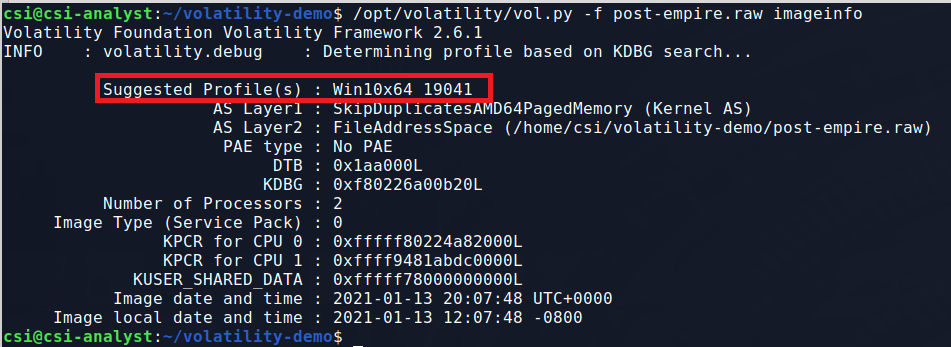
Volatility 3 is smarter than the old version; it automatically tries to identify the OS. You start by getting basic info.
python3 vol.py -f dump.mem windows.info- Why? This tells you the exact Windows build and the “KDBG” (Kernel Debugger) address, which is the starting point for all analysis.\
Step B: The Process “Sniff Test” (pslist vs psscan)
First, run the standard list:
python3 vol.py -f dump.mem windows.pslistThis shows you what the computer thought was running. Now, run the scan:
python3 vol.py -f dump.mem windows.psscan- The Hunt: If you see a process in
psscanthat did not appear inpslist, you have found Hidden Malware. It unlinked itself from the OS to hide, but the physical object is still in RAM.
Step C: Check for Malicious Parents (pstree)
Malware often tries to look like a system file.
python3 vol.py -f dump.mem windows.pstree- The Red Flag: If you see
svchost.exe(a system process) but its parent isnotepad.exe, you have a compromise. System processes are always started by specific “Services” parents, never by a user app like Notepad.
Step D: Extracting the Malware (procdump)
Once you find the suspicious PID (Process ID), you need to pull the “heart” out of the memory dump to analyze it further.
python3 vol.py -f dump.mem -o /output_dir windows.dumpfiles --pid <TARGET_PID>- The Result: Volatility will carve the executable out of the RAM dump. You can now upload this file to VirusTotal or put it in a sandbox to see exactly what the attacker was doing.
3. The “Hidden” Artifacts (malfind)
Sometimes malware doesn’t run as its own process; it hides inside a legitimate process (like Chrome). This is called Code Injection.
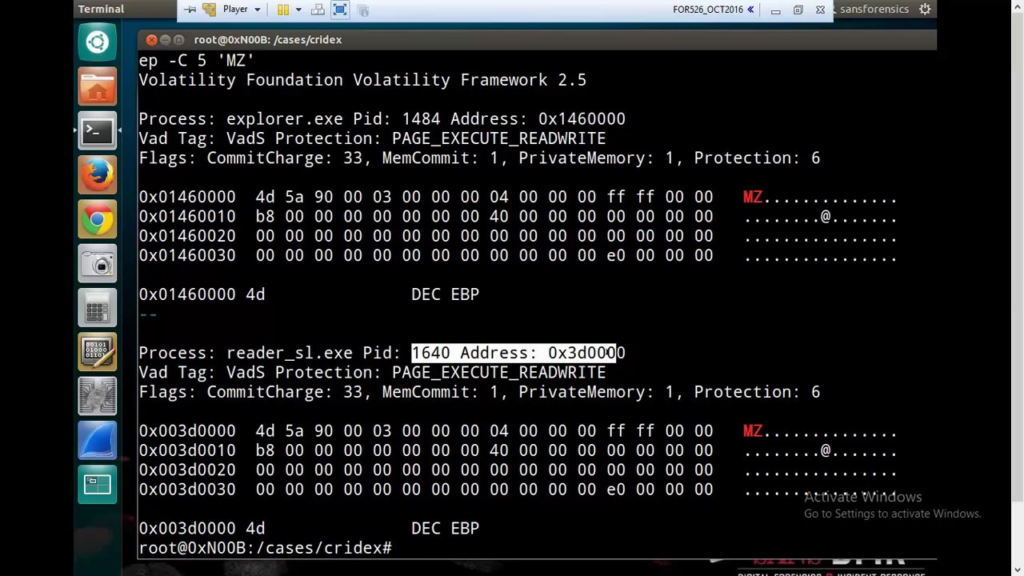
python3 vol.py -f dump.mem windows.malfindWhat it looks for: It searches for memory pages marked as PAGE_EXECUTE_READWRITE (RWX). Legitimate software almost never has memory that is both Writable and Executable at the same time—that is the classic signature of a malware “shellcode” waiting to trigger.