


We are now moving into Section 3: File System Internalization. In Section 1, we looked at the physical “ground” (Sectors and Clusters). In Section 2, we captured the “lightning” (RAM). Now, we must understand the Administrative Brain of the Windows environment: the Master File Table (MFT).
If the NTFS (New Technology File System) is a sprawling metropolis, the MFT is the Central Records Office. Every single thing that exists on an NTFS volume—every file, every folder, even the MFT itself—must have an entry here. To a forensic investigator, the MFT is the most important artifact on a disk because it records not just what is there now, but the ghosts of what was there before.
1. The Architecture of the MFT Record
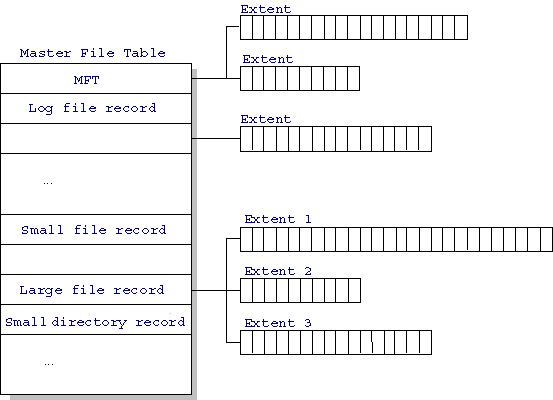
The MFT is a hidden system file named $MFT. It is composed of a series of fixed-size “slots” or Records, each typically 1024 bytes (1KB) in size.
When you create a file named evidence.txt, the OS finds an empty 1KB slot in the MFT and fills it with metadata. If the file is deleted, the OS doesn’t wipe this 1KB slot; it simply changes a single flag from “In Use” to “Available.” This is why we can “undelete” files—the metadata remains until a new file’s metadata overwrites that specific slot.
The Standard Attribute Layout:
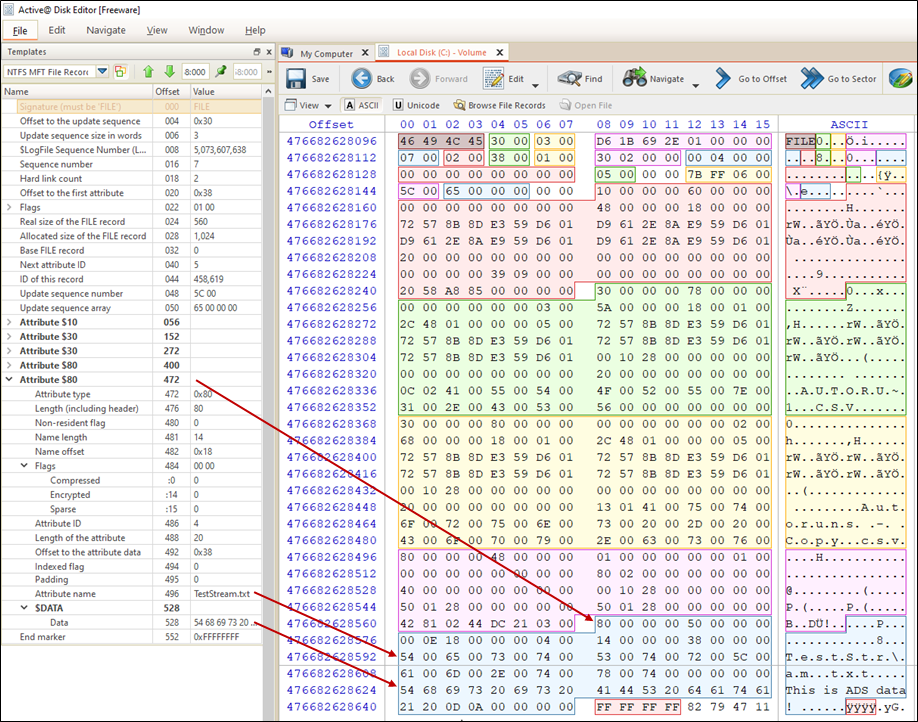
Inside that 1024-byte record, the data is organized into Attributes. Each attribute has a specific type code:
- $STANDARD_INFORMATION (Type 0x10): Contains the “Standard” MACB timestamps (Modified, Accessed, Created, MFT-Changed). This is what the Windows API shows you.
- $FILE_NAME (Type 0x30): Contains the file name, parent directory information, and another set of MACB timestamps. Crucial Intel: Malware often “Timestomps” the $STANDARD_INFORMATION attribute to hide, but it often forgets to change the $FILE_NAME timestamps, creating a discrepancy that alerts investigators.
- $DATA (Type 0x80): This is where the actual content of the file lives (or a pointer to it).
2. Resident vs. Non-Resident Data
This is a critical concept for “hidden” data recovery.
- Resident Data: If a file is very small (usually under 700–800 bytes), the NTFS is so efficient that it stores the actual content of the file directly inside the MFT record in the
$DATAattribute.- Forensic Impact: Even if a suspect wipes the “Free Space” on a drive, a resident file’s content survives because it lives inside the MFT, not in the data clusters.
- Non-Resident Data: If the file is large, the
$DATAattribute contains Data Runs—essentially a list of addresses (clusters) where the actual file content is stored on the physical disk.
3. The “Timestomping” Detection (The 0x10 vs 0x30 Discrepancy)
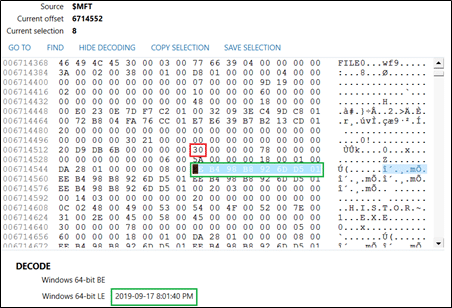
When a sophisticated attacker compromises a system, they use tools like nimbustre or timestomp to change the “Created” date of their malware to 2010, making it look like a legacy system file.
However, NTFS is redundant.
- The $STANDARD_INFORMATION (0x10) attribute is easily changed by user-level tools.
- The $FILE_NAME (0x30) attribute can only be changed by the System Kernel.
Investigative Workflow: An analyst uses a tool like MFTECmd.exe (by Eric Zimmerman) to parse the $MFT. If the 0x10 Created Time is 2010-01-01 but the 0x30 Created Time is 2024-12-18, you have 100% proof of Anti-Forensic Activity. The file was actually created today and manually backdated.
4. MFT Entry 0 through 11: The System Metadata Files
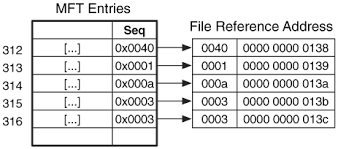
The first 12 entries in the MFT are reserved for the file system itself. They all start with a $ sign:
- Entry 0 ($MFT): The MFT’s record of itself.
- Entry 2 ($LogFile): A transactional journal. If the power cuts, NTFS uses this to recover. It contains “Undo” and “Redo” operations that can reveal recently deleted data.
- Entry 5 ($): The Root Directory.
- Entry 6 ($Bitmap): A map of every cluster on the disk, marking them as “0” (Free) or “1” (In Use). This is how we find “Unallocated Space” to search for deleted files.
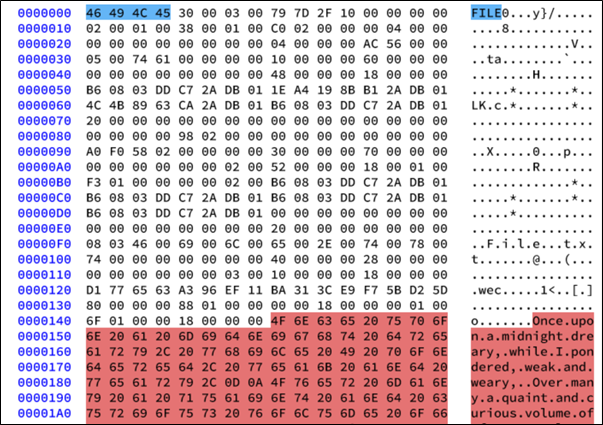
5. The “MFT Slack” Phenomenon
This image is a classic example of MFT (Master File Table) Slack analysis, a common technique in digital forensics. It demonstrates how a fixed-size data structure can “trap” older data that was never properly wiped.
Here is a breakdown of what you are looking at:
1. The Structure of the MFT Record
In the NTFS file system, every file has an entry in the MFT. Each entry is a fixed size—typically 1,024 bytes (1KB).
- The Blue Highlight: At the very beginning (offset
00), you see the magic number46 49 4C 45which translates to “FILE” in ASCII. This is the standard header for an MFT record. - The White/Unshaded Area: This contains the active metadata for the current file, such as its standard information (timestamps), file name, and data pointers.
2. The Concept of “Slack”
Because the MFT record is always 1,024 bytes, the operating system allocates that entire block even if the file’s metadata only needs 400 bytes.
- When a new file occupies an MFT slot that was previously used by a different file, it overwrites the beginning of the record.
- If the new file’s metadata is smaller than the old file’s metadata, the “tail end” of the old data remains behind. This is the MFT Slack.
3. Forensic Evidence (The Red Highlight)
The red area in your image is the “smoking gun” for a forensic investigator.
- The Data: You can clearly read the ASCII text: “Once upon a midnight dreary, while I pondered, weak and weary…” * The Context: This is the beginning of Edgar Allan Poe’s The Raven.
- The Conclusion: The current file associated with this MFT record is likely a very small file (perhaps a system file or a tiny shortcut). However, this MFT slot was previously used for a file containing the text of The Raven.
Even though the user or the system “deleted” the old poem and created a new file, the evidence of the poem persists in this 1KB buffer because the new file wasn’t “large” enough to overwrite the entire record.
Why this matters:
- Recovery of “Deleted” Info: It allows investigators to find fragments of filenames, paths, or even small file contents (resident data) that are no longer indexed by the file system.
- Privacy: It shows that simply deleting a file does not remove its metadata from the MFT until that specific space is overwritten by a larger record.
6. Technical Procedure: Extracting and Parsing the MFT
In a live environment, the $MFT is locked by the kernel. You cannot simply copy it.
Step 1: Raw Acquisition We use a tool like FTK Imager or KAPE to perform a raw read of the disk, bypassing the OS locks to extract the $MFT file.
Step 2: Parsing to CSV We use MFTECmd.exe:
MFTECmd.exe -f "C:\Forensics\Acquisition\$MFT" --csv "C:\Analysis\Output"Step 3: Timeline Analysis We load the resulting CSV into Timeline Explorer. We now have a list of every file that has ever existed on that machine, its size, its physical location, and its true “DNA” timestamps.
Operator Intelligence Summary
- Focus Keyphrase: NTFS Master File Table Forensic Analysis
- Tags: MFT Records, Resident Data, Timestomping, $STANDARD_INFORMATION, File System Forensics
The MFT is the ultimate witness. It doesn’t just tell you what happened; it tells you what the attacker tried to hide.