n the modern threat landscape, the phishing email is the primary vector for initial compromise. It bypasses technical controls by exploiting the human element. For a forensic operator, understanding how to dissect an email header is akin to being a digital detective tracing a physical letter back to its true sender, regardless of the fake return address. This lecture deep-dives into the granular details of email headers, transforming cryptic lines of text into a definitive map of a message’s journey and its malicious origin.
1. The Invisible Envelope: What are Email Headers?
An email is fundamentally a text file sent over the Internet. It consists of two main parts:
- Body: The visible message content.
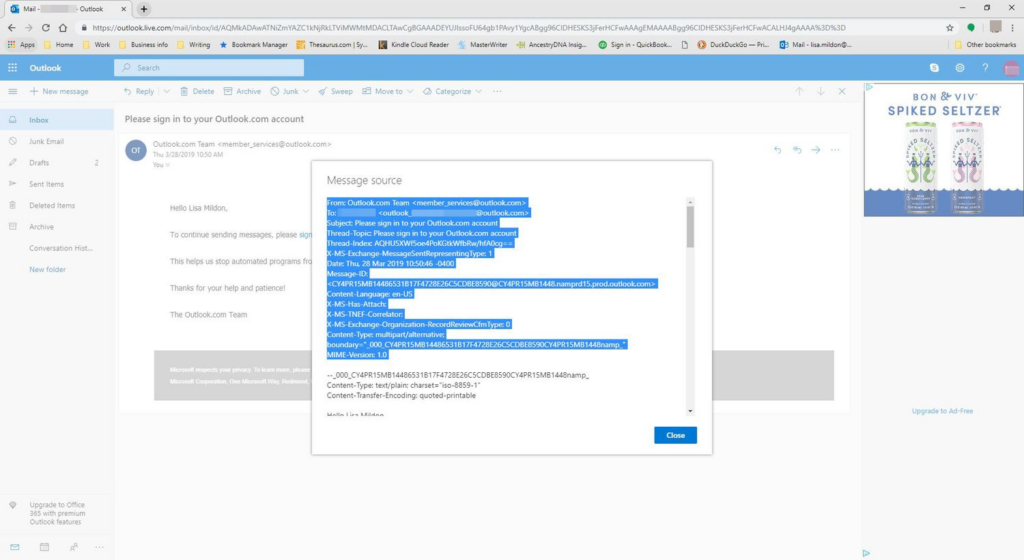
- Headers: A collection of metadata lines that precede the body, separated by a blank line. These headers are added by every server, client, and relay agent involved in the email’s transmission. While most users only see the “From,” “To,” and “Subject” fields, a forensic header contains dozens of critical data points.
The Principle of Trust (and Deception):
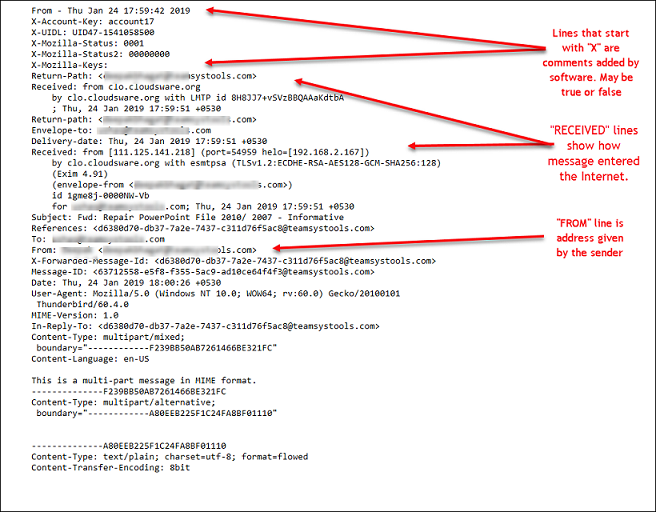
The crucial forensic insight is that while the “From” address can be easily spoofed (faked), the Received headers, added by legitimate mail servers, are much harder to forge. These provide the true trail.
2. Deconstructing the “Received” Header: The Hops
The Received header is the most vital forensic artifact in an email. Every time an email server receives a message, it prepends a new Received header to the top of the existing headers. This creates a chronological log, with the most recent hop at the top.
Key Components of a Received Header:
from [sending_server_name] ([sending_server_IP]): This identifies the server that sent the email to the current server. This IP is critical.by [receiving_server_name] ([receiving_server_IP]): This identifies the server that received the email (the current server).for [recipient_email]: Confirms the intended recipient.via [protocol]: Specifies the protocol used (e.g., SMTP).id [message_ID]: A unique identifier assigned by the receiving server.with [encryption/authentication]: Details like TLS encryption or SPF/DKIM verification status.[timestamp]: The exact time the email was received by this specific server.
Tracing the Path (Bottom-Up): To find the originating IP address of the sender, you read the Received headers from the bottom-most legitimate server up to the first server that handled the message. The IP address associated with that first hop is the most likely source.
3. Unmasking the Client: X-Mailer and User-Agent
These headers, if present, reveal the specific email client or software used by the sender.
X-Mailer: Often seen with desktop clients like Outlook, Thunderbird, or even custom scripts. E.g.,X-Mailer: Microsoft Outlook 16.0.User-Agent: More common with webmail services (Gmail, Outlook.com) and reveals browser details.
Forensic Value: If a phishing email claims to be from an internal company server but the X-Mailer indicates “PHP Mailer” or a custom script, it’s a strong indicator of spoofing. Attackers often don’t bother to mimic this detail.
4. Authentication & Security Headers
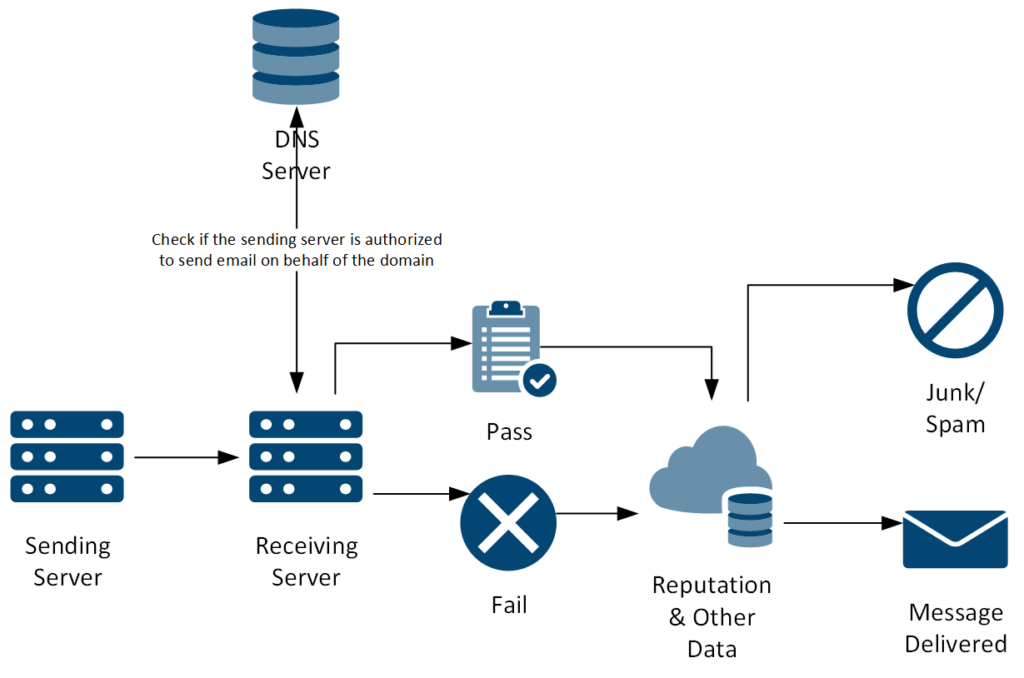
Modern email systems implement authentication protocols to combat spam and phishing. These headers provide valuable clues.
Authentication-Results: Reports the results of SPF (Sender Policy Framework) and DKIM (DomainKeys Identified Mail) checks.- SPF: Verifies if the sending IP is authorized by the sender’s domain. A
failresult means the email is likely spoofed. - DKIM: Verifies the email’s integrity by checking a digital signature. A
failindicates tampering.
- SPF: Verifies if the sending IP is authorized by the sender’s domain. A
ARC-Authentication-Results: An “Authenticated Received Chain” that allows mail servers to trust authentication results from previous hops, especially useful when emails are forwarded.
5. Other Informative Headers
Message-ID: A globally unique identifier assigned by the first mail server. Useful for cross-referencing with other logs (e.g., mail server logs, firewall logs) to find an email’s full journey.Date: The timestamp when the email was originally composed. Compare this toReceivedtimestamps to detect delays or anomalies.Content-Type: Indicates the format of the email body (e.g.,text/plain,text/html). Phishing emails often usetext/htmlto embed malicious links or hide their true nature.
6. Technical Procedure: The Interrogation
- Extract Full Headers: In Outlook, this is usually done via “File -> Properties -> Internet Headers.” For webmail, look for “Show Original” or “Download Message” options.
- Use an Online Header Analyzer: Tools like
MXToolbox Email Header AnalyzerorGoogle Admin Toolbox Messageheadercan quickly parse and visualize the headers, often highlighting suspicious IPs. - Manual Trace: For critical investigations, manually trace the
Receivedheaders from bottom to top, identifying each server hop and its associated IP. - Geo-locate IPs: Use
whoisorARINto find the geographical location of the originating IP. This often reveals the true country of origin, which may contradict the sender’s apparent location. - Correlate with Event Logs (p3.4): If the originating IP is an internal address, check local system event logs for logins or activity from that IP at the corresponding timestamp.
- Threat Intelligence: Query any identified suspicious IPs or domains against threat intelligence platforms (e.g., VirusTotal, AbuseIPDB) to check for known malicious activity.