On this page
U111300 (shown as U1113 00 in VCDS) is a Volkswagen Group fault code that appears on Audi, VW, Seat, Skoda and Porsche models. VCDS describes it as “Function restriction due to faults in other modules”; other tools show “function limitation due to received malfunction value”. It means the module that stored it received a signal that another module had flagged as faulty or invalid, so it switched one of its own functions off to stay safe. U111300 is almost always a secondary code: the real fault is in a different module. Fix the module that is reporting a real fault (an engine, ABS, steering angle, radar or power supply fault, for example) and the U111300 entries usually clear themselves.
What U111300 really tells you
In a modern VAG car, modules constantly exchange signals over CAN and FlexRay: engine torque, wheel speeds, steering angle, gear, brake status and many more. Each signal carries a status. When a module reports that one of its own signals is invalid because it has a fault, every module that uses that signal limits the functions that depend on it and stores U111300.
So the code says “I am working, but I am limiting something because someone else has a problem.” That is why one real fault, such as a failing wheel speed sensor or an engine fault, can produce U111300 in the ABS, steering, adaptive cruise, lane assist, parking brake and instrument cluster at the same time.
U111300 vs U111100 vs network codes
| Code (VCDS) | Text | What it means |
|---|---|---|
| U1113 00 | Function restriction due to faults in other modules | The signal arrived, but the sender flagged it as faulty |
| U1111 00 | Function restricted due to missing message(s) | The expected message did not arrive at all (time-out) |
| U0100, U0121 and similar | Lost communication with a specific module | A whole module disappeared from the bus |
U1113 points you to a faulty function in another module. U1111 and lost-communication codes point you more toward power, wiring or a module that is offline. Generic versions of those network codes are explained in U0100, U0121 and U0001.
How to find the real fault
- Run a full scan of every module, not only the engine. Save the report with freeze frame and extended details.
- Read the extended information of each U111300 entry. VCDS and OBDeleven often show the signal or message behind it in brackets, for example a torque limitation signal from the engine or a parking brake status. That name tells you which module sent the bad value.
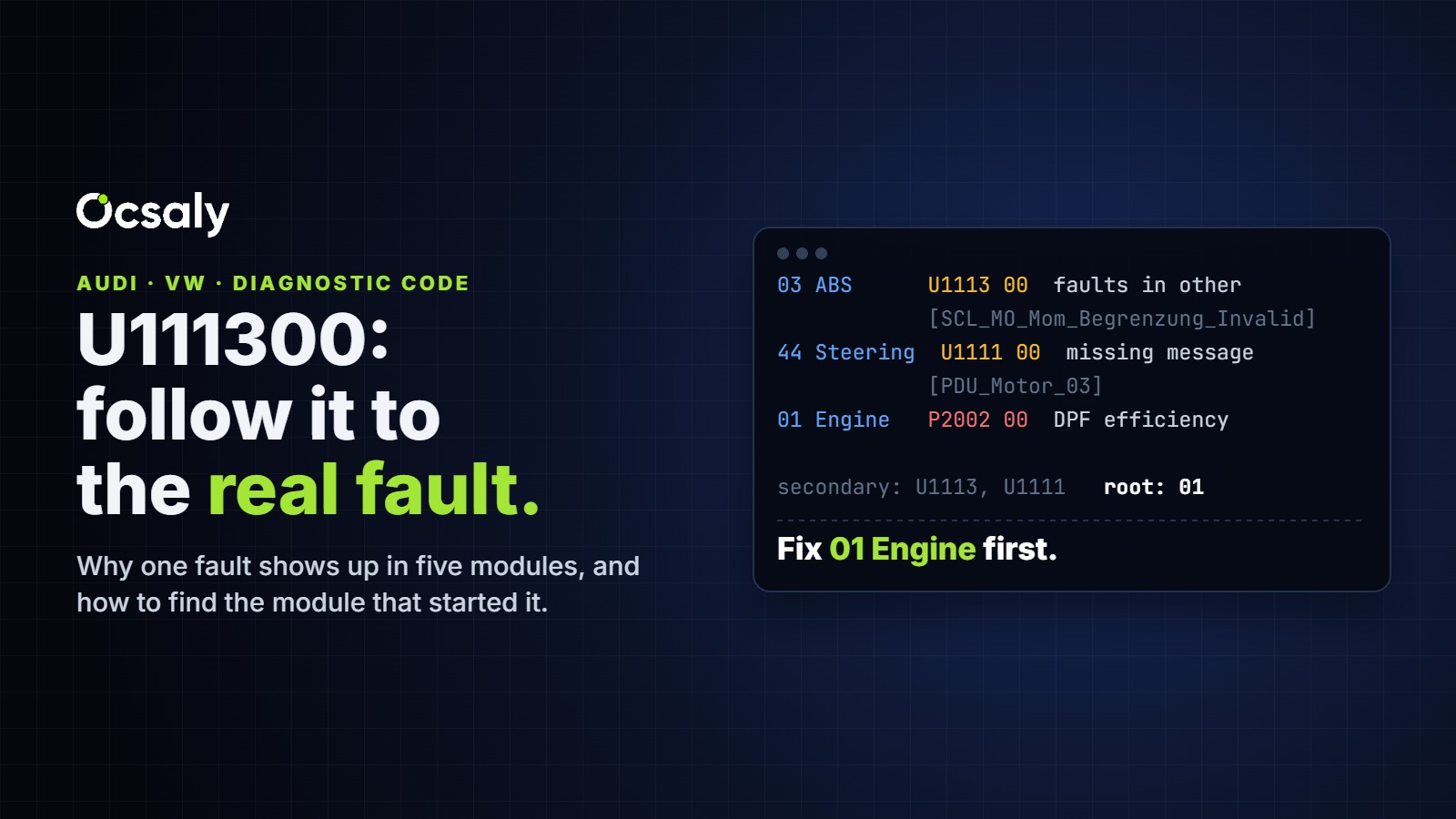
- List the non-U codes. P, C and B codes in other modules (engine, ABS, steering angle, radar, battery or voltage faults) are usually the real problem. In the example in the picture, the engine has a real fault and the ABS and steering modules only report the consequences.
- Check the supply voltage. Low battery voltage or a failing power supply relay can make several modules report faults at once, which then cascade into U111300 everywhere. Charge or test the battery and look for voltage-related codes.
- Fix the root fault, clear all modules, then test drive. Some functions need a drive cycle or a basic setting (for example a steering angle sensor calibration) before their codes stay clear.
- If U111300 returns alone, look at when it is set (the freeze frame shows mileage, speed and voltage) and check the sending module’s wiring and connectors for intermittent faults.
Common root causes behind U111300
- Engine faults that make the engine control module limit torque (sensor, boost, emissions or DPF faults)
- Wheel speed sensor or ABS faults that make speed signals invalid
- Steering angle sensor not calibrated after an alignment or steering repair
- Radar or camera faults (adaptive cruise, lane assist) after a windscreen or bumper repair
- Low battery voltage, a failing battery, or a battery replaced without being adapted
- Electronic parking brake or transmission faults
- Retrofits or coding changes that leave a module expecting signals that do not exist
Can you ignore U111300?
The code itself is harmless, but the functions it limits may not be: adaptive cruise, lane assist, stop-start, stability control or the parking brake may be switched off. Treat it as a pointer to another fault and find that one.
Related guides: U112300 VW/Audi code explained, U0100 code, J2534 pass-thru explained.
Frequently asked questions
What does U111300 mean on an Audi?
It means a control module limited one of its functions because it received a faulty or invalid value from another module. It is a secondary code; the real fault is stored as a separate code in a different module.
Why does U111300 appear in many modules at once?
Because many modules use the same signal. When one module reports a fault in a signal it sends, every module that relies on it stores U111300.
What is the difference between U111300 and U111100?
U111300 (U1113 00) means the signal arrived but was flagged as faulty. U111100 (U1111 00) means an expected message did not arrive at all, which points more to a module that is offline, a power supply problem or a wiring fault.
Will clearing U111300 fix the problem?
Only temporarily. If the root fault is still present, the code returns. Fix the module with the real fault, then clear all modules.
Which tools can read U111300 details?
VCDS, OBDeleven, ODIS and most good multi-brand scan tools read it. Use one that shows the extended details or freeze frame, because they name the signal that caused it.
Understand what modules are telling each other
Codes like U111300 make sense once you know how modules share signals on the bus. Our Car Electronics & Car Hacking course teaches how ECUs communicate over CAN, how to capture and decode their messages and how to diagnose electrical faults at the source.