On this page
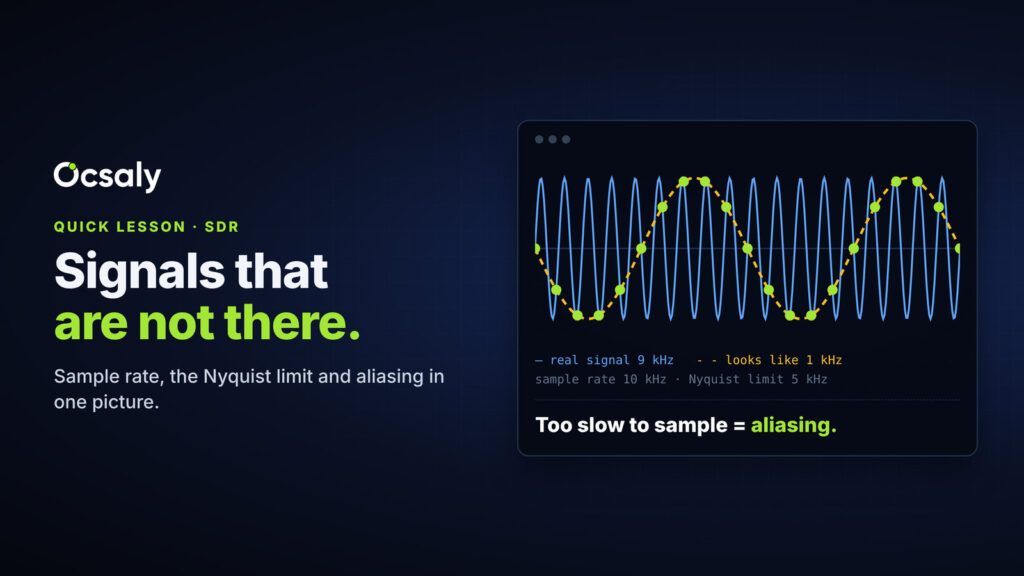
In software-defined radio (SDR), the sample rate decides how much of the spectrum you can see at once and which signals you can capture correctly. The Nyquist theorem says you must sample at more than twice the highest frequency you want to capture. Sample too slowly and a signal shows up at the wrong frequency, an effect called aliasing. With the complex (IQ) sampling used by SDRs, the usable bandwidth roughly equals the sample rate: 2.4 MS/s shows about 2.4 MHz of spectrum.
This guide explains sample rate, bandwidth, the Nyquist limit, gain and demodulation in plain language, lists the frequencies worth exploring first, and shows the commands to get started. Begin with the two labs below.
Interactive SDR lab
In Lab 1, change the signal frequency and the sample rate and watch aliasing happen. In Lab 2, type any frequency to see what you can hear there and whether your receiver can tune to it.
Sample rate and the Nyquist theorem
A receiver does not see a continuous wave. It takes snapshots, called samples. To describe a wave correctly you need more than two samples per cycle, so the highest frequency you can capture is half the sample rate: the Nyquist frequency.
| Sample rate | Nyquist limit (real sampling) | Visible bandwidth (complex IQ sampling) |
|---|---|---|
| 48 kHz (sound card) | 24 kHz | – |
| 250 kS/s | 125 kHz | about 250 kHz |
| 2.4 MS/s (typical RTL-SDR) | 1.2 MHz | about 2.4 MHz |
| 20 MS/s (HackRF One maximum) | 10 MHz | about 20 MHz |
Above the Nyquist limit, a signal “folds” back and appears at a lower frequency. SDRs prevent this with analog filters before the converter, but every filter has a slope, which is why signals near the edges of your display are less reliable than those in the middle.
Centre frequency, bandwidth and the DC spike
An SDR tunes to a centre frequency and shows the band around it, as wide as the sample rate. Many low-cost SDRs show a spike exactly in the middle of the display. That is the “DC spike”, caused by the receiver hardware, not a real signal. Tune slightly off to the side (offset tuning) so the signal you care about is not sitting on it.
Gain: more is not better
Gain amplifies everything, noise included. Too little and weak signals disappear in the noise floor. Too much and strong nearby stations overload the receiver and create fake signals all over the spectrum. Start in the middle, then lower the gain until the noise floor drops while your signal stays clear. Automatic gain (AGC) is convenient but often too high near strong transmitters.
Modulation and demodulation modes
| Mode | Typical bandwidth | Used for |
|---|---|---|
| WFM (wideband FM) | about 200 kHz | FM broadcast radio |
| NFM (narrowband FM) | 12.5 or 25 kHz | Walkie-talkies, amateur repeaters, marine radio |
| AM | 6 to 10 kHz | Airband, AM broadcast, CB |
| USB / LSB (single sideband) | about 3 kHz | Amateur radio and HF voice |
| OOK / FSK | varies | Remotes, weather stations and sensors on 433, 868 and 915 MHz |
| Digital (ADS-B, AIS, DMR and more) | varies | Decoded by dedicated software |
If a voice sounds distorted or silent, the mode or bandwidth is usually wrong: broadcast FM in NFM mode sounds terrible, and airband in FM mode sounds like nothing at all.
Frequencies worth exploring first
| Frequency | What you hear | Mode |
|---|---|---|
| 87.5 to 108 MHz | FM broadcast radio, the easiest first test | WFM |
| 118 to 137 MHz | Airband: air traffic control and pilots | AM |
| 144 to 148 MHz | 2 m amateur radio | NFM |
| 156 to 162 MHz | Marine VHF and AIS ship positions | NFM, digital |
| 433.92 MHz | Weather stations, remotes and sensors (Europe and more) | OOK, FSK |
| 868 / 915 MHz | Sensors and LoRa (Europe / Americas) | FSK, LoRa |
| 1090 MHz | ADS-B aircraft positions | Digital |
What you may legally listen to differs between countries. Some services, such as mobile phone calls or police radio, may be illegal to intercept or to share. Receiving is one thing, transmitting is another: never transmit without the right licence.
Getting started: tools and commands
| Tool | Use it for |
|---|---|
| SDR++, GQRX, SDR# | See the spectrum and listen (Windows, Linux, macOS) |
| GNU Radio | Build your own receivers and signal processing chains |
rtl_433 | Decode hundreds of 433, 868 and 915 MHz sensors |
dump1090 | Track aircraft with ADS-B on 1090 MHz |
rtl_power | Scan a wide band and log signal strength |
# check that the RTL-SDR works
rtl_test

# listen to FM radio at 98.5 MHz on Linux
rtl_fm -f 98.5M -M wbfm -s 200000 -r 48000 - | aplay -r 48000 -f S16_LE

# decode nearby sensors
rtl_433

# scan the FM band and save signal levels
rtl_power -f 88M:108M:125k -i 10 fm_scan.csv
A simple antenna helps a lot. A quarter-wave antenna is about 7500 divided by the frequency in MHz, in centimetres: about 17 cm for 433 MHz and about 7 cm for 1090 MHz.
Related guides: SDR++ tutorial.
Frequently asked questions
What sample rate should I use for an RTL-SDR?
About 2.4 MS/s is the highest rate most RTL-SDR dongles handle reliably without dropping samples. Lower rates such as 1 or 2 MS/s use less CPU and are enough for a single narrow signal. The sample rate roughly equals the bandwidth you see on screen.
What is the Nyquist theorem in simple terms?
To capture a signal correctly you must sample it more than twice per cycle. The highest frequency you can capture is therefore half the sample rate. Signals above that limit appear at a wrong, lower frequency, which is called aliasing.
Why is there a spike in the middle of my SDR display?
That is the DC spike, created by the receiver hardware at the exact centre frequency. It is not a real signal. Tune the centre frequency slightly away from the signal you want to hear, which is called offset tuning.
What frequencies can an RTL-SDR receive?
A typical RTL-SDR with an R820T2 or R828D tuner covers roughly 24 MHz to 1.7 GHz. Lower frequencies such as shortwave need an upconverter or a direct sampling mode, and Wi-Fi at 2.4 GHz needs a different SDR such as a HackRF.
Is it legal to use an SDR?
Owning and using an SDR receiver is legal in most countries. What you may listen to, record or share depends on local law, and some communications are protected. Transmitting always requires the appropriate licence or a licence-free band and approved equipment.
Where to go next
Sample rate is only the first step. Modulation, GNU Radio flowgraphs, the FFT, gain and filters, decimation, building your own AM receiver and working with RTL-SDR and HackRF are covered lesson by lesson in Software-Defined Radio and Signal Processing.