


0x01: What is Decompilation?
Decompilation is the process of translating low-level Assembly back into a high-level language like C. While a disassembler shows you every single MOV and ADD instruction, a decompiler analyzes those patterns and generates Pseudocode.
The Advantage: It allows you to “skim” through thousands of lines of code to find the core logic quickly.
The Limitation: Compilers are “lossy.” When code is compiled, the “human” parts—variable names, comments, and structure—are stripped away and destroyed.
0x02: The “Lossy” Nature of the Binary
When you decompile a function, you aren’t seeing the original source code; you are seeing a “best guess” by the decompiler (like Ghidra or IDA Pro).
| Feature | In Original Source | In Decompiled Pseudocode |
| Variable Names | int retry_count | int iVar1 |
| Comments | // Check for overflow | [REDACTED] |
| Logic Structure | Clear for or while loops | Often complex goto or if jumps |
| Function Names | validate_user() | FUN_00401234 (if symbols are stripped) |
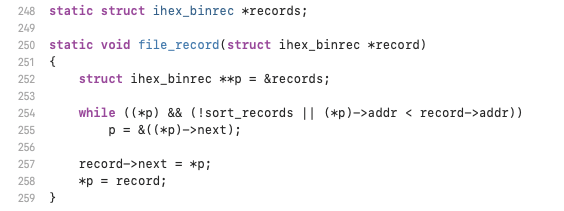
Because aggressive compilers optimize code to be fast rather than readable, they might reuse the same register for three different variables. A decompiler might get confused and merge those three variables into one, leading to an Analysis Error.
0x03: IDA Pro vs. Ghidra
In the field, you will likely use one of the two “Giants”:
- IDA Pro (Hex-Rays): The industry standard. Known for extremely clean pseudocode but comes with a high price tag.
- Ghidra (NSA): A powerful, free, open-source alternative. Its decompiler is excellent and highly customizable.
As seen in the file_record example, both tools show the “ghost” of the logic. You can see the if statements and function calls, but the intuitive feel of the original code is gone. This is why you must still be able to read the Assembly—it is the only source of truth when the decompiler makes a mistake.
0x04: Tactical Warning: Decompiler Deception
A decompiler can lie to you. If a compiler uses a clever optimization (like using a subtraction to perform a comparison), the decompiler might misinterpret the intent.
Interactive Lab (Pseudocode vs. Truth)
You are reviewing a decompiler’s output. The decompiler suggests a variable is a simple integer, but the assembly shows it is being used as an array pointer.
if (uVar1 == 0) {
  return 1;
}
cmp r0, #0
moveq r0, #1
bx lr
MISSION: The decompiler named the variable uVar1. Looking at the assembly, which Register did the decompiler use to generate that variable name?
0x05: Mission Task
Current Objective: Open Ghidra and load the
hellobinary we compiled in previous steps.Challenge: Locate the
mainfunction in the Symbol Tree and view the Decompiler window. Compare the decompiled code to your originalhello.csource.Observation: Did Ghidra successfully recover the string
"Hello!\n", or did it just show a memory address? This reveals how well the decompiler handles data references.
0x06: The C++ Abstraction Layer
C++ is a “superset” of C, meaning it adds features like Classes, Constructors, and Operator Overloading. These features make life easier for developers but add “noise” for the Reverse Engineer.
When we decompile C++, we often see:
- The
thisPointer: In C++, every class method needs to know which specific object it is working on. It does this by passing the memory address of the object as the first argument (usually in X0 or R0). - Mangled Names: C++ allows multiple functions to have the same name (overloading). To handle this, the compiler “mangles” the names into complex strings like
_ZN7OcsalyC1Ei. - Constructors: These look like standard functions but are called automatically when memory is allocated.
0x07: Case Study — C++ Class to Assembly
Let’s look at a simple C++ Class and see how a decompiler/disassembler breaks it down.
class Vault {
public:
    int balance;
    Vault(int initial) { balance = initial; }
    void deposit(int amount) { balance += amount; }
};

int main() {
    Vault myVault(100);
    myVault.deposit(50);
    return 0;
}The Disassembled Assembly (ARM64 Logic):
When we disassemble the deposit method, the “Magic” of C++ disappears, revealing the raw math.
<Vault::deposit(int)>:
  // X0 holds the 'this' pointer (address of myVault object)
  // W1 holds the 'amount' (50)
  ldr w2, [x0]      // Load current balance from memory at [x0] into w2
  add w2, w2, w1    // Add amount (w1) to current balance (w2)
  str w2, [x0]      // Store the new balance back into memory at [x0]
ret // Return to main0x10 Operator Insight: Notice that there is no variable named balance in the assembly. There is only an Offset. The decompiler sees [x0] and has to “guess” that this memory location represents a class member.
0x08: Tactical Lab (C++ Logic Extraction)
You have intercepted a C++ binary. You must determine how the decompiler represents a class member variable during a subtraction operation.
this->health = this->health - damage;
LDR W2, [X0]
SUB W2, W2, W1
STR W2, [X0]
MISSION: In the assembly above, which register acts as the ‘this’ pointer (the address of the object in memory)?
0x09: Mission Task
Current Objective: Compile the C++ Vault code using
g++ -O0 vault.cpp -o vault.Challenge: Run
nm vault | grep deposit. You will see a strange, long name like_ZN5Vault7depositEi.Explanation: This is Name Mangling. Use the command
c++filt _ZN5Vault7depositEito “demangle” it back into human-readable C++. As a Reverse Engineer,c++filtis your primary tool for making C++ binaries readable.
0x10: Visualizing Logic (The Branching Path)
In high-level C++, a simple if-else statement looks like a choice. In a binary, that choice becomes a Conditional Branch.
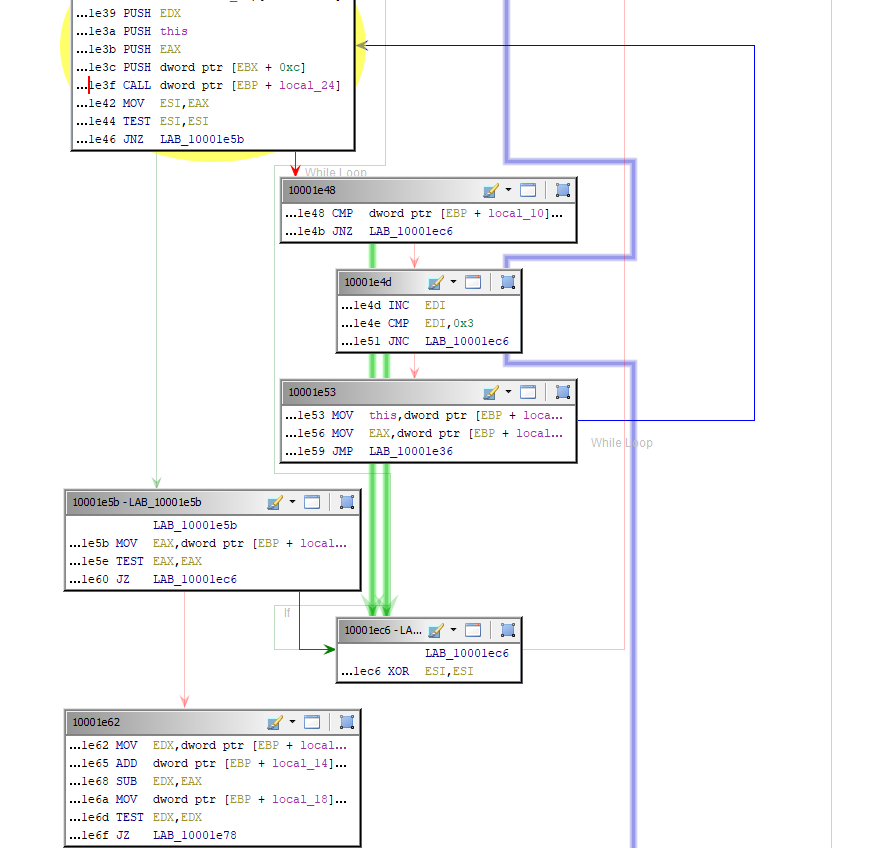
Modern reverse engineering tools (Ghidra, IDA, Binary Ninja) don’t just show you a list of instructions; they generate a visual graph.
- Nodes: Blocks of code that execute sequentially without jumping.
- Edges: Arrows representing the “jumps” (branches) between those blocks.
0x11: The “If-Else” Logic in Binary
When the CPU encounters a decision, it uses two steps:
- The Comparison (
CMP): This subtracts two values and sets the Status Flags (Zero, Negative, Carry). - The Conditional Jump (
B.EQ,B.NE,B.GT): This looks at the flags and decides whether to jump to a new address or continue to the next line.
if (balance >= 100) {
    status = "VIP";
} else {
    status = "Standard";
}Assembly Flow (ARM64):
CMP W0, #100      // Compare balance (W0) to 100
  B.LT label_else   // If Less Than (LT), jump to 'else' block
label_if:
  ADR X0, vip_str   // If we didn't jump, we are in the 'if' block
  B label_end       // Must jump over the else block!
label_else:
  ADR X0, std_str   // Code for 'else' block
label_end:
RET // End of function0x10 Operator Note: In the Control Flow Graph, label_if and label_else would be two separate boxes. The box containing the CMP instruction would have two arrows coming out of it: a Green arrow (Condition Met) and a Red arrow (Condition Failed).
0x12: Loop Reconnaissance
Loops are just “Backward Branches.” In a CFG, you can spot a loop instantly because one of the arrows points upward to a previous block.
- For Loops: Usually have a counter (index) that is incremented and compared at the end of each block.
- Infinite Loops: In malware, you often see a block that only has one arrow pointing back to itself—this is a “Stall” or a “Heartbeat” mechanism.
0x13: Tactical Lab (Branch Intelligence)
You are analyzing a security check binary. You must determine which branch leads to the “Access Granted” logic.
CMP W0, #0xDEADC0DE
B.NE BLOCK_C
PRINT “ACCESS_DENIED”
PRINT “ACCESS_GRANTED”
MISSION: If register W0 contains the value 0xDEADC0DE, which block will the CPU execute next?
0x14: The Importance of Dead Code
In complex binaries, you will often find Orphan Blocks—pieces of code in the CFG that have no arrows pointing to them.
- Malware Analysis: These are often “dormant” payloads waiting to be activated by a remote command.
- Obfuscation: Developers sometimes add “Junk Code” with impossible conditions (e.g.,
if (1 == 2)) to confuse reverse engineers and break decompilers.
0x15: Mission Task
Current Objective: Open the
vaultbinary in Ghidra. Click on the “Display Function Graph” icon in the top toolbar.Challenge: Look at the
depositfunction. Does it have a straight vertical line (Single Block) or multiple branches?Explanation: If you didn’t include an
ifstatement in thedepositcode, it should be a single box. If you added a check (e.g.,if (amount > 0)), you will see the graph split into two paths. This is the visual proof of your code’s decision-making.