
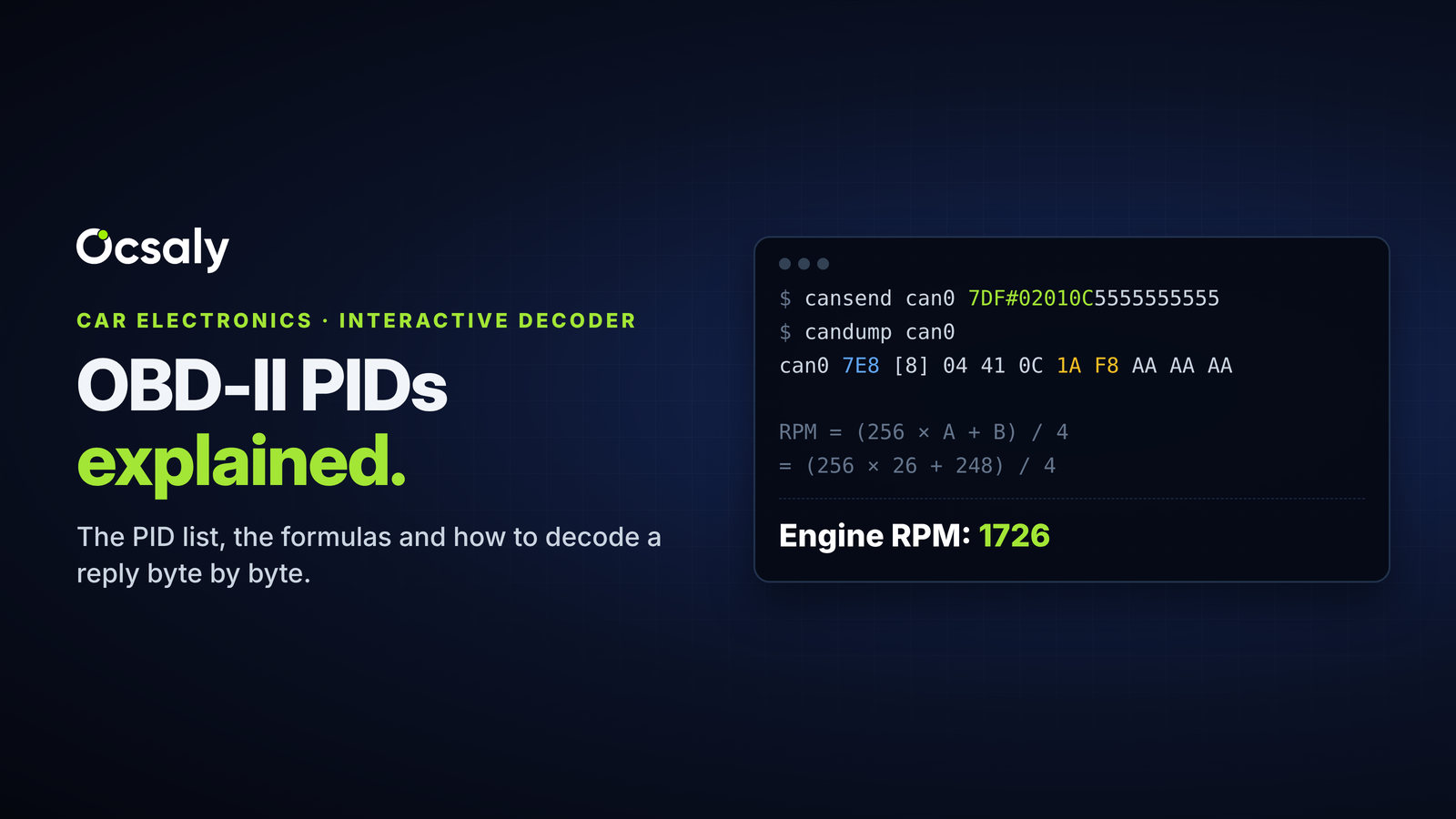
OBD-II PIDs (Parameter IDs) are the codes a scan tool uses to ask a car’s engine computer for live data such as engine RPM, vehicle speed or coolant temperature. Each PID has a fixed number and a formula that turns the raw bytes of the reply into a real value. For example, PID 0C returns two bytes, A and B, and the engine speed is (256 × A + B) / 4 rpm.
This guide lists the most useful mode 01 PIDs with their formulas, shows what a request and reply look like on the CAN bus, and lets you decode replies yourself in the interactive decoder below.
How an OBD-II PID request works
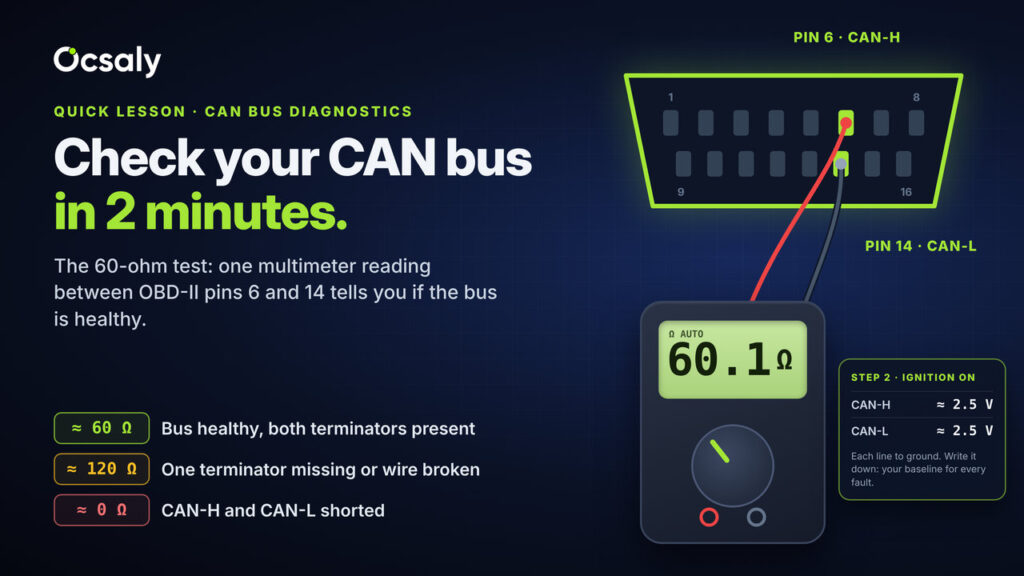
On every car sold in the US since the 2008 model year (and most European cars from the early 2000s), OBD-II runs over the CAN bus on pins 6 (CAN high) and 14 (CAN low) of the diagnostic connector, usually at 500 kbit/s. A scan tool sends a request and the engine control unit (ECU) answers:
| Frame | CAN ID | Data bytes | Meaning |
|---|---|---|---|
| Request | 7DF | 02 01 0C 55 55 55 55 55 | 2 bytes follow: mode 01 (current data), PID 0C (engine RPM). The rest is padding |
| Reply | 7E8 | 04 41 0C 1A F8 AA AA AA | 4 bytes follow: 41 = reply to mode 01, PID 0C, then A = 0x1A, B = 0xF8 |
Decoding the example: A = 0x1A = 26 and B = 0xF8 = 248, so RPM = (256 × 26 + 248) / 4 = 1726 rpm. 7DF is the broadcast address that every emissions-related ECU listens to. The engine ECU usually replies from 7E8, the transmission from 7E9. Padding bytes differ between cars and can be 00, 55 or AA.
OBD-II PID list with formulas
These are the mode 01 PIDs you will use most. A is the first data byte after the PID, B the second.
| PID (hex) | Value | Bytes | Formula | Unit |
|---|---|---|---|---|
00 | Supported PIDs 01 to 20 | 4 | Bit field: each bit = one PID | – |
04 | Calculated engine load | 1 | A × 100 / 255 | % |
05 | Engine coolant temperature | 1 | A − 40 | °C |
0B | Intake manifold absolute pressure | 1 | A | kPa |
0C | Engine RPM | 2 | (256 × A + B) / 4 | rpm |
0D | Vehicle speed | 1 | A | km/h |
0F | Intake air temperature | 1 | A − 40 | °C |
10 | Mass air flow (MAF) rate | 2 | (256 × A + B) / 100 | g/s |
11 | Throttle position | 1 | A × 100 / 255 | % |
1F | Run time since engine start | 2 | 256 × A + B | s |
2F | Fuel tank level | 1 | A × 100 / 255 | % |
42 | Control module voltage | 2 | (256 × A + B) / 1000 | V |
46 | Ambient air temperature | 1 | A − 40 | °C |
Not every car supports every PID. Ask PID 00 first: the four bytes of the reply are a bit map of which PIDs from 01 to 20 the ECU supports. PID 20 does the same for 21 to 40, and so on.
OBD-II modes (services)
| Mode | What it does |
|---|---|
01 | Show current data (live PIDs such as RPM and speed) |
02 | Show freeze frame data saved when a fault code was set |
03 | Read stored diagnostic trouble codes (DTCs) |
04 | Clear trouble codes and reset emission monitors |
07 | Read pending trouble codes |
09 | Read vehicle information such as the VIN (PID 02) |
A reply always uses the mode plus 0x40, which is why a mode 01 request comes back as 41 and a mode 09 request as 49.
How to read PIDs yourself
With an ELM327 adapter
Cheap ELM327 Bluetooth or USB adapters accept the request as text. Send 010C and the adapter answers 41 0C 1A F8, without the CAN ID and length byte. Terminal apps and libraries such as python-OBD do this for you.
With SocketCAN on Linux
With a CAN interface (for example a USB-CAN adapter) you work with raw frames, which is how you learn what really happens on the bus:
# bring the interface up at 500 kbit/s
sudo ip link set can0 up type can bitrate 500000

# watch all traffic in one terminal
candump can0

# ask for engine RPM in another
cansend can0 7DF#02010C5555555555
Only connect to vehicles you own or have permission to work on, and never send frames other than standard diagnostic requests while a car is being driven.
Why a PID shows no value or a strange value
- No reply: the car does not support that PID, the ignition is off, or the bus speed is wrong. Check PID 00 first.
- Wrong numbers: you used the wrong bytes. A is the byte right after the PID, not the length byte or the 41.
- Two replies: two ECUs answered the broadcast (for example 7E8 and 7E9). Each one is valid for its own module.
- Temperature of −40 °C: the sensor reported 0, which usually means a disconnected sensor or an unsupported value.
If the bus itself is the problem, start with the physical checks: the 60-ohm termination test and the CAN high and low voltages. Both are explained with an interactive lab in CAN bus explained: how it works and how to test it.
Frequently asked questions
What is an OBD-II PID?
An OBD-II PID (Parameter ID) is a code a scan tool sends to a vehicle ECU to request one piece of live data, such as engine RPM (PID 0C) or vehicle speed (PID 0D). The ECU replies with raw bytes that are converted into a value with a standard formula.
How do you calculate RPM from OBD-II data?
Request mode 01 PID 0C. The reply contains two data bytes, A and B. Engine RPM = (256 × A + B) / 4. For example, A = 0x1A (26) and B = 0xF8 (248) gives (6656 + 248) / 4 = 1726 rpm.
What CAN ID does OBD-II use?
On CAN-based OBD-II with 11-bit IDs, requests are usually broadcast on ID 0x7DF. ECUs answer on IDs 0x7E8 to 0x7EF, with the engine ECU typically on 0x7E8. Physical requests to one ECU use 0x7E0 to 0x7E7.
Why does my car not support some PIDs?
Manufacturers only have to support the PIDs relevant to their engine and emissions system. Request PID 00 to get a bit map of the PIDs from 01 to 20 that your ECU supports, then PID 20 for 21 to 40, and so on.
Is reading OBD-II PIDs safe?
Reading standard mode 01 PIDs with a scan tool or ELM327 adapter is safe and is what every workshop does. Clearing codes (mode 04) resets emission monitors, and sending non-standard frames to a moving vehicle can be dangerous, so only experiment on a parked car you own.
Where to go next
Decoding PIDs is the first step. Reading raw CAN traffic, finding manufacturer-specific messages and diagnosing the network electrically are covered lesson by lesson in Car Electronics and Car Hacking: Diagnose, Fix and Hack.